Call us on +254724495659 or +254708744335 to place your order.

Call us on +254724495659 or +254708744335 to place your order.


Hotline Order:

Email ID:
sales@scartek.co.ke
-
JBL PartyBox On-The-Go is a popular portable Bluetooth party speaker that delivers powerful sound, fun lights, and karaoke features in a take-anywhere design. It’s great for beach parties, picnics, or backyard gatherings.
Here are some fresh looks at the speaker in action:

Key Features & Specifications
- Power Output: 100W RMS of JBL Pro Sound (crisp highs, clear mids, and strong bass with Bass Boost button)
- Drivers: 1 × 5.25″ (133 mm) woofer + 2 × 1.75″ (44 mm) tweeters
- Frequency Response: 50 Hz – 20 kHz (-6 dB)
- Battery Life: Up to 6 hours of playtime (rechargeable Li-ion battery, ~3.5 hours charging time)
- Connectivity: Bluetooth 4.2 (range ~10 m / 33 ft), USB playback (thumb drive), AUX input (3.5 mm), mic/guitar inputs
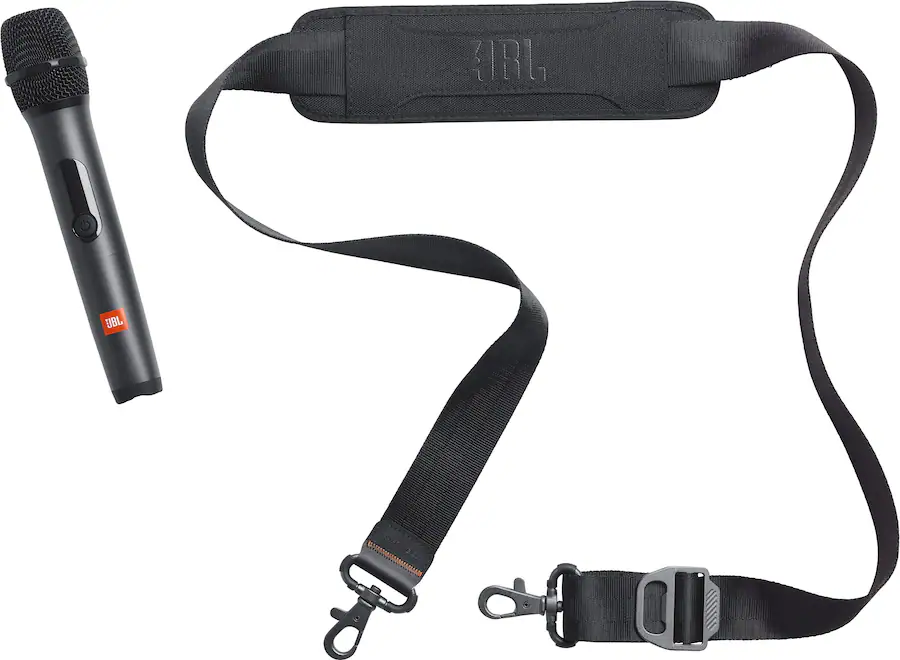
- Karaoke Ready: Includes 1 wireless microphone (some regions get 2), echo/bass/treble controls for vocals, plus a second mic input
- Lights: Synced dynamic light show that pulses with the music
- Portability: Padded shoulder strap with built-in bottle opener, IPX4 splashproof rating (splash-resistant, not fully waterproof)
- Extra: True Wireless Stereo (TWS) pairing with another identical unit for stereo sound, USB charge-out for your phone
Here’s a closer view of the shoulder strap + wireless mic setup, plus the handy control panel:
Quick Start Guide
- Charge → Plug in the power cable (full charge in ~3.5 hrs).
- Power on → Press the power button.
- Bluetooth → Press the Bluetooth button → pair from your phone (“JBL PartyBox On-The-Go”).
- Play → Stream music, insert USB drive, or connect via AUX.
- Party mode → Turn on lights, activate Bass Boost, connect the mic for karaoke, adjust echo/volume knobs.
- TWS → Hold the TWS button on two units to pair them in stereo.