-
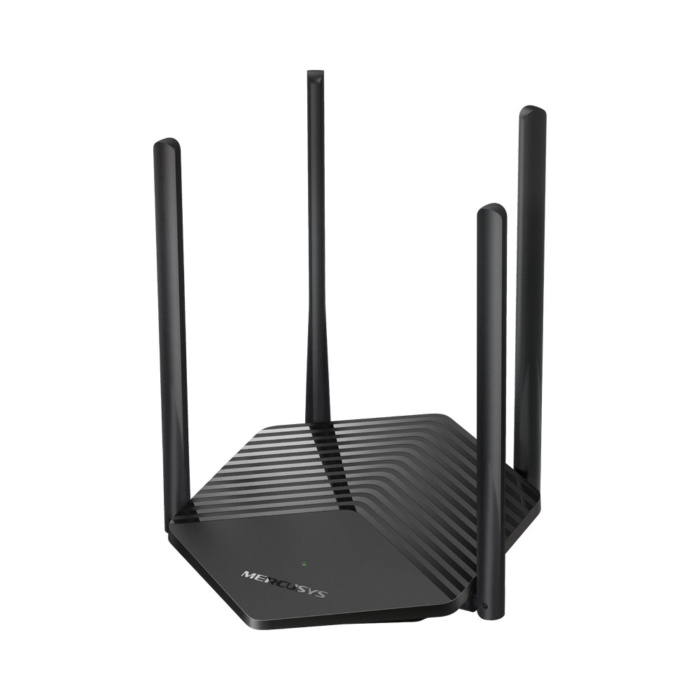
Mercusys MR60X AX1500 Dual-Band Wi-Fi 6 Router
-
Mercusys MR60X AX1500 Dual-Band Wi-Fi 6 Router is a budget-friendly, next-generation networking device designed to upgrade home and office networks.Technical Specifications
-
- Wireless Standard: Wi-Fi 6 (802.11ax), backwards compatible with older standards.
- Combined Speeds: Up to 1500 Mbps.
-
- 5 GHz Band: Up to 1201 Mbps.
- 2.4 GHz Band: Up to 300 Mbps.
-
- Hardware Ports: Full Gigabit Ethernet (1 × Gigabit WAN Port, 2–3 × Gigabit LAN Ports) for maximum wired connection speeds.
- Antennas: 4 × external multi-directional high-gain antennas.
Core Technology & Features-
- MU-MIMO & OFDMA: Drastically increases capacity. It handles simultaneous transmissions to multiple devices, minimizing lag and network buffering.
- Beamforming: Concentrates the wireless signal directly toward connected devices for stable coverage.
- Smart Connect: Merges both bands under a single Wi-Fi name (SSID). Devices automatically switch to the fastest, strongest band.
- WPA3 Security: Equipped with the latest encryption standard to defend against brute-force attacks.
- BSS Color: Marks adjacent network signal frames to minimize interference from neighboring networks.
- Network Management: Features parental controls, guest network setups, and Quality of Service (QoS) priorities.
Watch this step-by-step unboxing and setup video for the Mercusys MR60X:59sHow to Set Up Mercusys MR60X v2 | How to Setup Mercusys …TONOR – How to setup routerYouTube · 30 Jan 2026Quick Setup Steps- Connect the power adapter to the wall and your router. Power on the device.
- Plug your broadband internet cable into the designated WAN port.
- Connect your computer to the router via an Ethernet cable or use the default Wi-Fi name and password located on the bottom label.
- Open a web browser and visit MERCUSYS Login to create an admin password and complete the setup wizard. Alternatively, manage setup through the official MERCUSYS App.
-
Call us on +254724495659 or +254708744335 to place your order.
Call us on +254724495659 or +254708744335 to place your order.

Hotline Order:

Email ID:
sales@scartek.co.ke