-
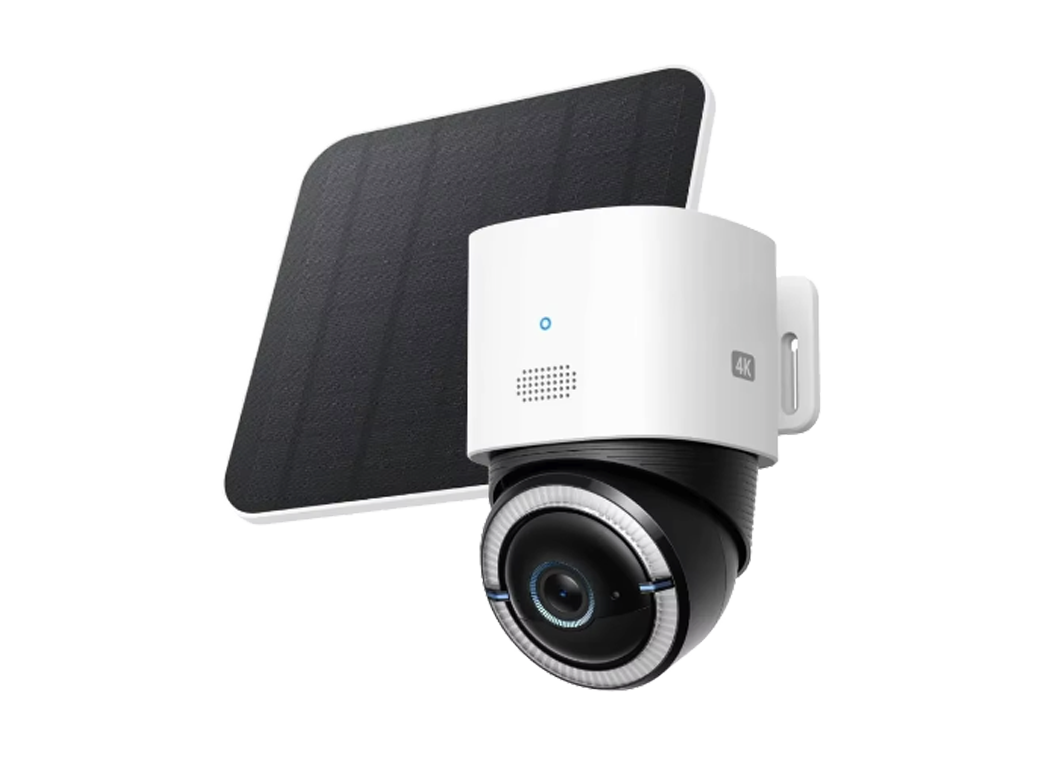
Eufy Security 4G LTE Cam S330 security camera
- Eufy Security 4G LTE Cam S330, a wireless security camera with a 4K resolution camera and an included solar panel.
- The camera supports both 4G cellular and Wi-Fi connectivity, allowing it to function in locations without internet access.
- It features 360-degree pan and tilt capabilities, solar power functionality, and AI-based human and vehicle tracking.
-
This is a fully wireless, solar-powered 4K security camera designed for remote or off-grid locations. It offers hybrid 4G LTE + Wi-Fi connectivity, 360° pan-tilt control, advanced AI detection, and “Forever Power” with a large battery and included solar panel. Perfect for areas without reliable power or internet.
Key Features & Specifications
- Resolution: 4K UHD (3840×2160) with 8MP sensor.
- Connectivity: Dual-mode 4G LTE + 2.4 GHz Wi-Fi (auto-switches if Wi-Fi drops).
- Viewing Angle: 130°–138° field of view with 360° pan and 70°–90° tilt.
- Power: 9,400 mAh rechargeable battery + 5W solar panel (2 hours of daily sunlight for continuous operation).
- AI Intelligence: Human & vehicle detection/tracking, activity zones, license plate recognition (limited range).
- Night Vision: IR + color night vision with 100-lumen spotlight.
- Audio: Two-way talk with noise cancellation.
- Storage: microSD card slot (up to 128GB or more; often includes 32GB) — local storage, no monthly fees.
- Weatherproof: IP65 rating.
- Other: Fast notifications, siren, customizable alerts, works with eufy Security app.
Basic Instructions for Use
- Unbox & Charge:
- Fully charge the camera using the included USB-C cable or connect the solar panel before setup (recommended for first use).
- Insert Cards:
- Open the camera cover and insert a compatible nano-SIM card (for 4G) and microSD card for local recording.
- App Setup:
- Download the eufy Security app and create/log in to an account.
- Power on the camera (press the sync button if needed).
- Follow in-app instructions to scan the QR code and add the camera (select 4G or Wi-Fi mode).
- Mounting:
- Mount the camera on a wall or ceiling using the included bracket (ensure good view and sunlight exposure).
- Mount the solar panel separately, angled toward the sun for optimal charging, and connect it to the camera.
- Operation & Settings:
- Use the app to control pan/tilt, live view, recordings, and alerts.
- Enable AI tracking, set activity zones, and customize detection sensitivity.
- Monitor battery level and solar charging status in the app.
Safety & Tips:
- Place the solar panel in direct sunlight for best performance.
- Use a data-enabled SIM card (some kits include a trial SIM).
- Avoid extreme temperatures for optimal battery life.
- Firmware updates via the app improve performance and security.
- This camera stores footage locally — no cloud subscription required for basic features.
- For best 4G performance, check signal strength at the installation site.
Call us on +254724495659 or +254708744335 to place your order.
Call us on +254724495659 or +254708744335 to place your order.

Hotline Order:

Email ID:
sales@scartek.co.ke