-
Overview
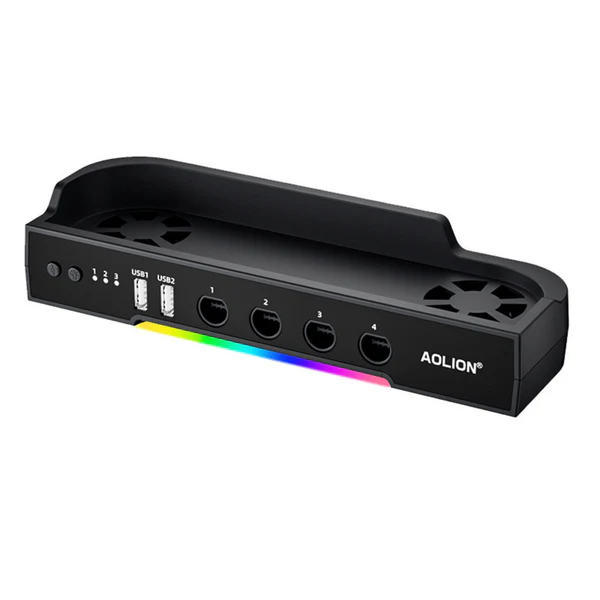
Nintendo Switch 2 “cooling bases” typically refer to cooling stands or dock attachments that enhance airflow for the console, especially during long docked sessions where the built-in fan alone may not suffice for intensive games like Mario Kart World or Cyberpunk 2077. The Switch 2’s dock has a fan primarily for its own circuitry (not the console), so third-party options add targeted cooling via adjustable fans, reducing temps by 5–15°C and preventing throttling.
Top Cooling Bases
Focus on docked stands with fans; all compatible with Switch 2’s 7.9-inch form and 4K output. Prices reflect BF deals (Nov 26, 2025).
Brand/Model Fan Setup/Speeds Key Features Best For JSAUX GP0201A Single / Stepless adjustable Clips to dock vents, 3–5hr battery, LED temp display, USB-C PD charging Versatile docked cooling Powerwave RGB Stand Dual / 3 speeds RGB modes, front USB-A/C ports, wall-mountable Aesthetic setups NEWDERY Dual-Fan Dock Dual / 3 speeds 6 game slots, 3 USB ports, RGB lights Accessory hubs OLCLSS Dock Fan Dual / High-speed adjustable Quiet operation, wall holes, 2 USB ports Budget performance IINE Dock Cooler Dual / Adjustable RGB lighting, plug-and-play, enhanced airflow Easy installs Venom RGB Cooling Stand Dual / Adjustable Joy-Con compatible, extra controller storage Full setups Pros and Cons
Pros:
- Effective Temp Drop: Reduces docked heat by 10–15°C, stabilizing FPS in demanding titles; users note less fan noise from console.
- Added Utility: USB ports for charging controllers; adjustable speeds for quiet modes.
- Affordable & Portable: Under $25 on sale; easy clip-on, no tools needed.
- RGB/Custom Looks: Enhances setups; some include game storage.
- BF Value: 30–40% off beats launch prices; reliable for 2+ years.
Cons:
- Dock-Only Focus: Not for handheld; may add slight bulk to setup.
- Noise at Max Speed: Fans audible (though quieter than stock); RGB can be gimmicky.
- Power Draw: Needs dock USB; battery models drain faster on high.
Call us on +254724495659 or +254708744335 to place your order.
Call us on +254724495659 or +254708744335 to place your order.

Hotline Order:

Email ID:
sales@scartek.co.ke