-
dji mic 3 (2 user)
-
DJI Mic 3 – Using 2 Transmitters (User 1 & User 2)
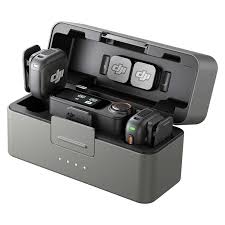
The DJI Mic 3 is DJI’s latest wireless microphone system with advanced features like 32-bit float recording (excellent dynamic range, less clipping worry), touchscreen receiver, longer range, and support for up to 4 transmitters per receiver (great for interviews/podcasts). Dual-transmitter kits are common for 2-person setups.
Pairing the Second Transmitter (User 2 / TX2)
Transmitters are usually pre-linked, but to add or reconnect the second one:
- Auto Link: Put both transmitters + receiver in the charging case, close/open it — they pair automatically.
- Manual Linking (recommended for issues):
- Power on the receiver and the second transmitter.
- On TX2 (User 2): Press and hold the linking button for ~2 seconds → LED blinks blue and green alternately.
- On the receiver: Press and hold the linking button (or use touchscreen: swipe down → Link Device) until the TX status LED blinks.
- Success: LEDs turn solid (usually green/blue).
For Direct Bluetooth (phones/cameras like Osmo Pocket): Hold the linking/power button on the transmitter to enter Bluetooth mode, then select it on your device.
Key Features for Dual Use
- Channels: Supports Stereo (TX1 left / TX2 right — perfect for separating voices in post) or other modes like Mono/Quad (with 4 TX).
- Group Control: Swipe up on the receiver screen to control both transmitters at once (mute, noise cancel, internal recording).
- Internal Recording: Each TX records backup audio locally (32-bit float).
- Noise Cancellation: Per-transmitter or group toggle.
- Multi-Receiver Groups: Advanced setups allow multiple receivers linked.
Troubleshooting Common Issues
- LEDs not syncing? Reset via charging case or firmware update (via DJI app/computer).
- Range/Interference: Up to hundreds of meters in open areas; 2.4GHz band can have issues in crowded environments.
- Firmware: Always update for best performance with new devices
Call us on +254724495659 or +254708744335 to place your order.
Call us on +254724495659 or +254708744335 to place your order.

Hotline Order:

Email ID:
sales@scartek.co.ke
DJI Mic 3 (2 user)
KSh39,999
-
Key Features
• Dual-transmitter wireless microphone system for 2 users
• 48kHz/24-bit lossless audio transmission
• 32-bit float internal recording for enhanced audio protection
• Up to 400m wireless transmission range
• Adaptive Gain Control for balanced audio levels
• Three voice tone presets (Regular, Rich, Bright)
• Two-level intelligent noise cancellation
• Built-in timecode for easier multi-camera synchronization