-
-
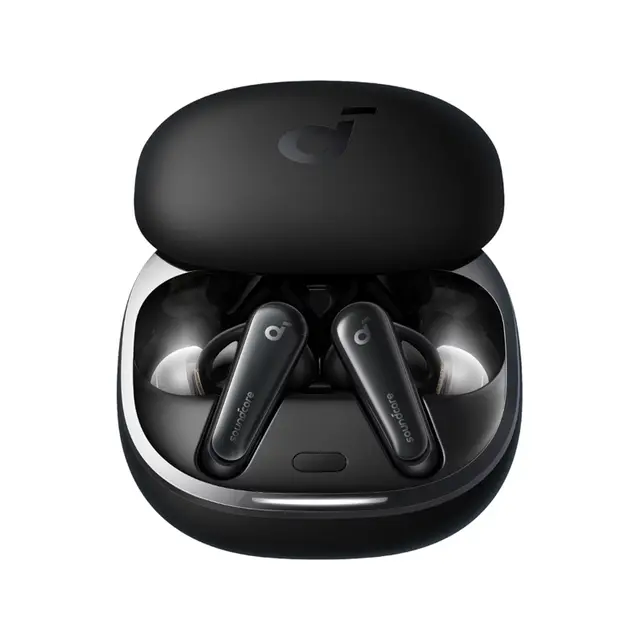
Anker Soundcore Liberty 4
These are premium true wireless earbuds featuring ACAA 3.0 coaxial dual dynamic drivers (9.2mm + 6mm), adaptive ANC, and spatial audio. They deliver high-resolution sound with LDAC support, heart rate monitoring, and excellent comfort for everyday use, workouts, and calls.
Key Features & Specifications
- Sound: ACAA 3.0 dual dynamic drivers, HearID personalized sound/EQ, LDAC Hi-Res codec support.
- Noise Control: Adaptive ANC (HearID ANC), Transparency mode, Normal mode.
- Spatial Audio: 360° immersive sound with head tracking (music & movie modes).
- Battery: Up to 9 hours (ANC off) / 7 hours (ANC on) per charge; 28 hours total with case. Fast charge: 15 mins = 3 hours.
- Controls: Squeeze/pinch controls (customizable via app).
- Calls: 6 mics with AI noise reduction.
- Other: Bluetooth 5.3, multipoint connection (2 devices), in-ear heart rate sensor, IPX4 water resistance, CloudComfort ear tips, wireless charging case support.
- Weight: ~5.6g per earbud.
Basic Instructions for Use
- Initial Charge:
- Remove the insulation sticker from the earbuds (if present).
- Place them in the charging case and close the lid.
- Charge the case via USB-C cable or wireless charger. Fully charge before first use.
- Wearing:
- Select the best-fitting ear tips (S/M/L included) for a secure seal.
- Insert and gently twist for comfort. Use the soundcore app Fit Test for optimal ANC performance.
- Power On & Pairing:
- Open the charging case lid — earbuds power on and enter pairing mode automatically.
- On your device, select “soundcore Liberty 4” from the Bluetooth list.
- Download the soundcore app (iOS/Android) for full features: EQ, ANC customization, spatial audio, heart rate tracking, firmware updates, etc.
- Controls (Default; customizable in app):
- Squeeze once (L/R): Play/Pause.
- Squeeze twice: Answer/End call or switch ambient modes.
- Squeeze three times: Next/Previous track or voice assistant.
- Charging & Battery:
- Return earbuds to the case to charge and power off.
- Check battery levels in the app or via case LEDs.
nce
-
Call us on +254724495659 or +254708744335 to place your order.
Call us on +254724495659 or +254708744335 to place your order.

Hotline Order:

Email ID:
sales@scartek.co.ke